 Goals Module
Turn goals into action. Track every step.
Oddapy Goals gives you four distinct frameworks to manage your tasks — from a quick to-do to a 60-day habit challenge. Every task connects to your calendar. Performance is measured automatically. You always know where you stand.
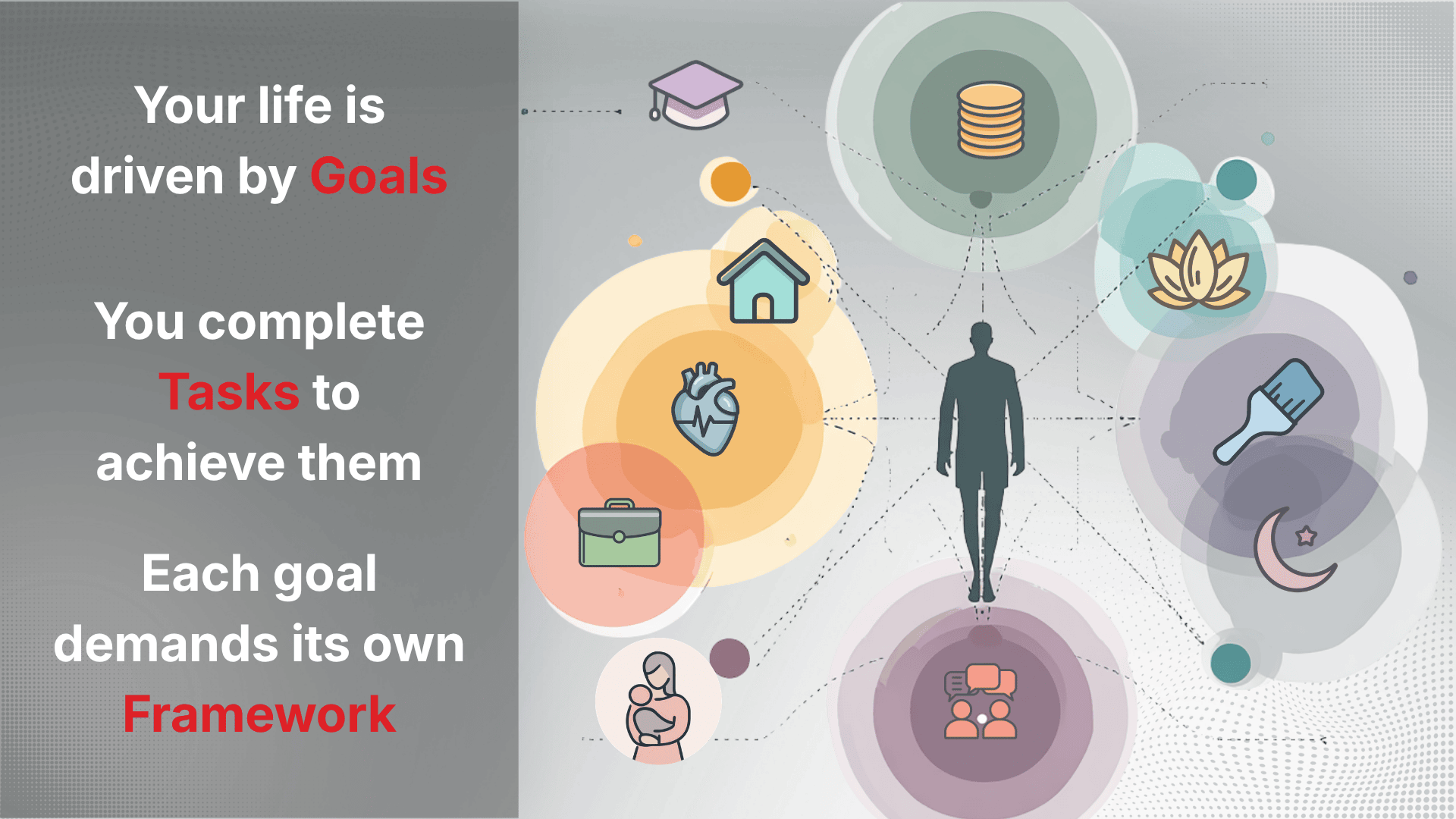
You don't lack goals. You lack a system.
Most people carry a dozen goals in their head at any given time — live a healthy life, get organized, finish a project, build a new habit. You complete tasks to achieve a goal. But without a structure to hold them, goals stay as intentions. They float, they overlap, they get forgotten.
A to-do list can track one-off tasks. A habit tracker can count streaks. A project tool can manage milestones. But none of these alone reflects how your goals actually work — some are daily, some are one-time, some take 60 days of discipline, and some require coordinating multiple tasks toward a single outcome.
That's why Oddapy doesn't offer one way to track goals. It offers four.
Four frameworks for four kinds of goals
Every goal you pursue fits one of four shapes. Oddapy gives each its own structure, rules, and tracking logic — because a daily habit and a one-time errand shouldn't be managed the same way.

To Do
For ad hoc tasks with minimal overheadReturn a package. Call the electrician. Buy a birthday gift. These are one-off tasks that need to get done but don't belong to a larger mission. Create a task, and mark it complete when it's done.
Calendar integration is optional — attach a time slot if the task needs one, or leave it floating if it doesn't. If a slot is set, performance assessment applies: complete early for a bonus, complete late for a penalty. If no deadline, the task simply tracks completion.

Routines
For recurring tasks that shape your day, week, month, or yearWake up at 6. Review your inbox every Monday. Do a monthly budget check. Pay annual insurance. Routines are the activities that create structure and discipline in your life. They don't have an end date — their value lies in consistency, not completion.
Every routine task requires a recurring calendar slot: daily, weekly, monthly, or yearly. An end date defines how long the recurrence runs. Streaks track how many consecutive cycles you complete on time. The longer your streak, the clearer the evidence that the routine has taken hold.

Habit
For deliberately forming new behaviors over a sustained periodStart meditating. Read every day. Stop checking your phone first thing in the morning. Habits are fundamentally different from routines — routines maintain existing discipline, while habits build new discipline from scratch. That takes sustained, daily effort.
Every habit task requires a daily recurring calendar slot for a minimum of 60 days. This isn't arbitrary — it reflects the research on how long it takes for a behavior to become automatic. The calendar slot ensures you've allocated time for the habit every single day, and the 60-day minimum ensures you're committing to real change, not a weekend experiment.
The Habit Building Scorecard, accessible from MyDay, gives you a visual performance report. Color-coded indicators show your record across any date range: dark green for tasks completed ahead of schedule, red for late completions. The goal is simple — keep everything in the green.

Projects
For multi-step objectives with a defined outcomeRenovate a room. Plan a wedding. Launch a side project. Complete an assignment. Projects are goals that require multiple tasks, often spread across several days or weeks, all working toward a single defined outcome.
A project contains one or more tasks, each with its own calendar slot, deadline, and priority. The project's performance is an aggregate — it reflects how well you completed all the tasks within it, not just one. The project is considered complete when every task inside it is finished.
At a glance
| Goal Type | Calendar | Duration | Recurrence | Assessment Focus |
|---|---|---|---|---|
| To Do | Optional | Finite | Optional | Completion |
| Routines | Required | Ongoing | Daily / Weekly / Monthly / Yearly | Consistency & streaks |
| Habit Building | Required | Min. 60 days | Daily only | Streak integrity |
| Projects | Required per task | Finite | Optional | Aggregate task completion |
To Do
Routines
Habit Building
Projects
Every task has a place on your timeline
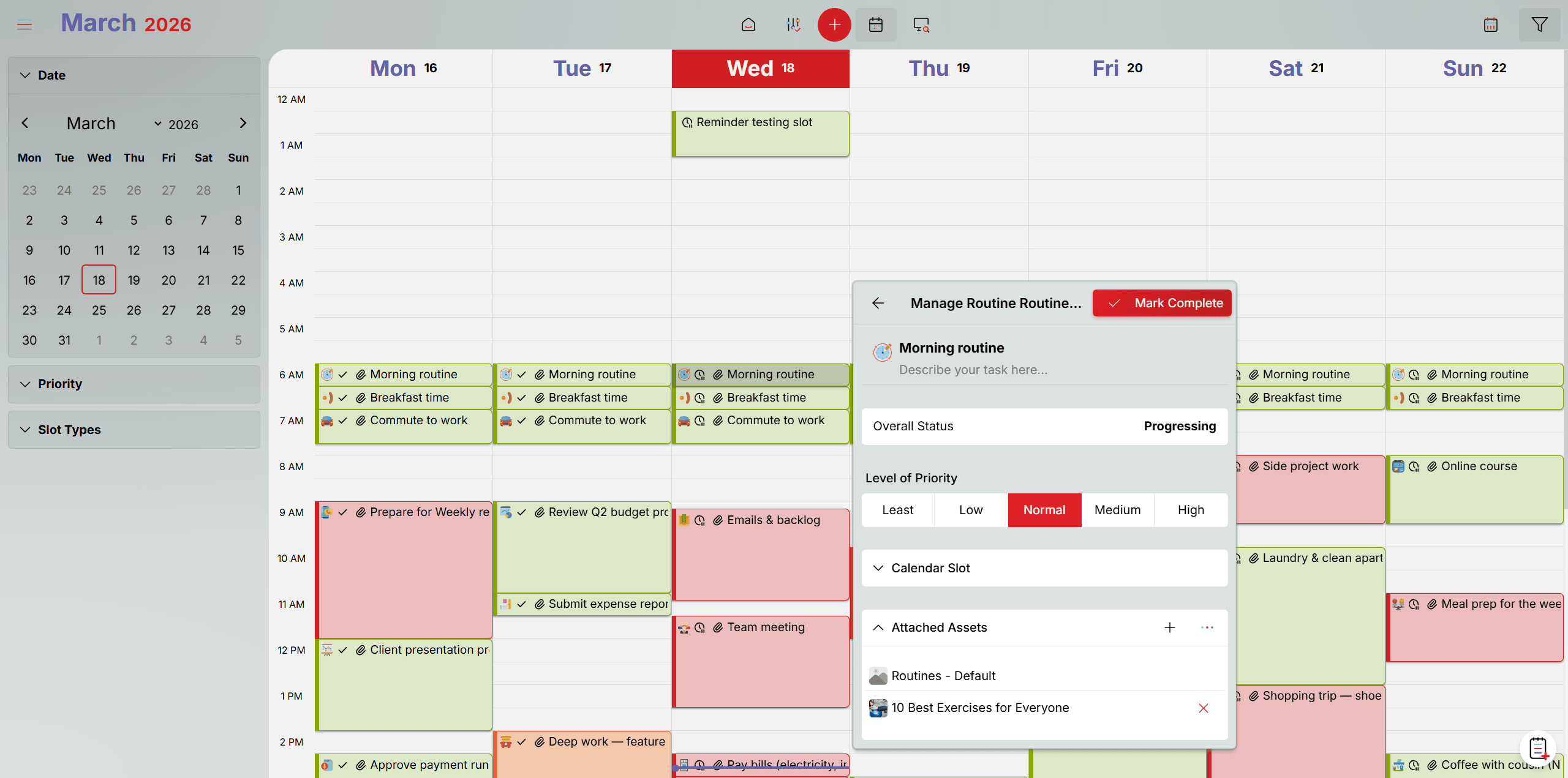
A goal without a time slot is just a wish. Oddapy connects every task to your calendar so it has a scheduled place in your day. Routines, Habits, and Project tasks require a calendar slot — you set the start date, time of day, duration, repetition type, repeat days, and end date when creating the task. To Do tasks are the exception — attaching a calendar slot is optional, giving you flexibility for quick, low-overhead tasks.
Calendar slots are fully interactive. Drag to reschedule. Resize to adjust duration. Set priority levels. Create single or recurring slots. When the scheduled time arrives, Oddapy sends you a notification so nothing slips past unnoticed — and the task is right there in your calendar, ready to act on.
For repeating slots, every change asks you to confirm the scope: this occurrence only, or this and all future occurrences. You stay in control of your schedule without accidentally disrupting the rest of the series — and your past performance data remains untouched.
Start every day knowing exactly what to do
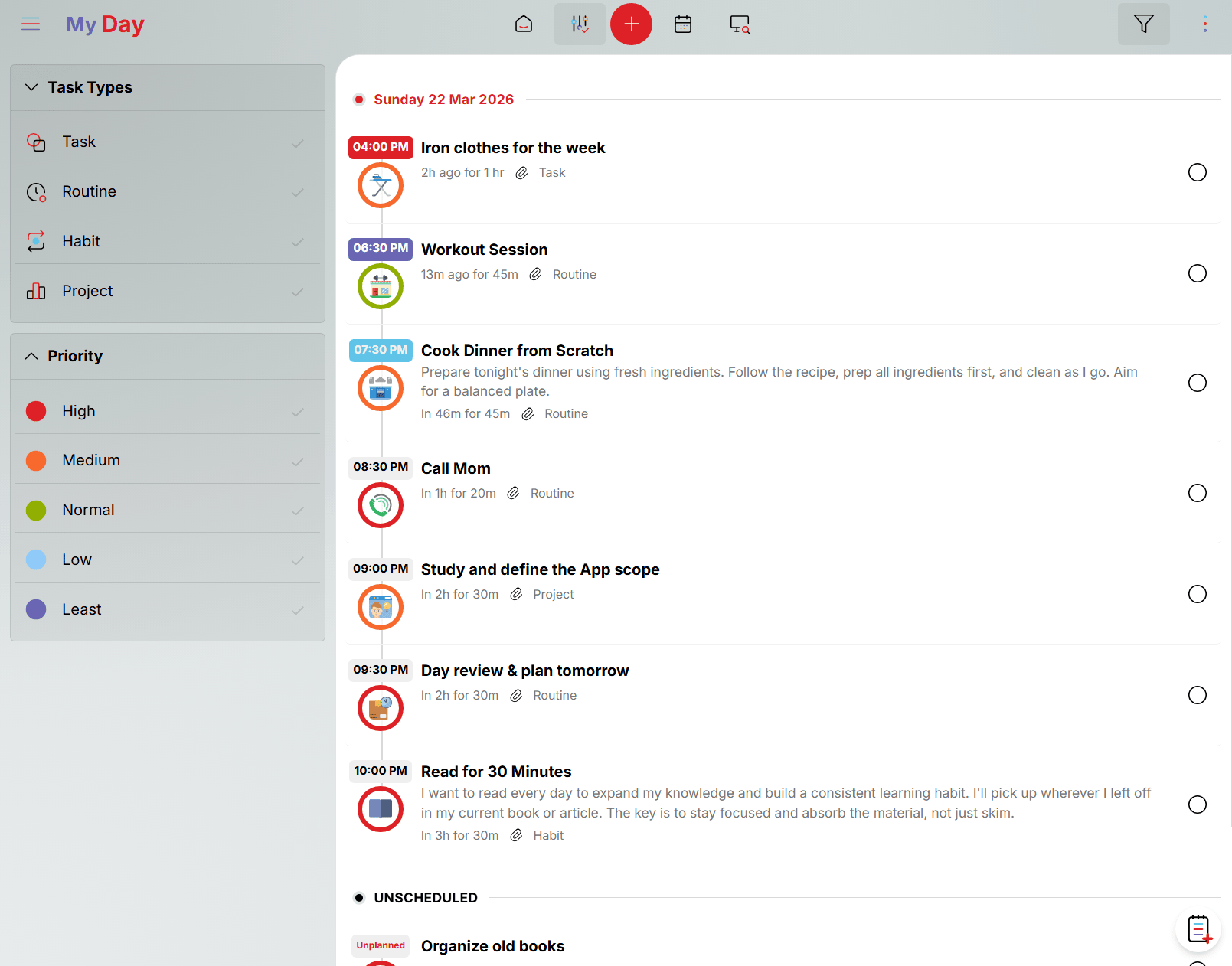
MyDay presents your day as a timeline — flowing from your first task to your last, with each task appearing as a milestone along the way. Tasks from different goals sit together in sequence, arranged by their scheduled time, giving you a clear visual flow of how your day unfolds.
Overdue tasks from previous days appear at the top so they're addressed first. Unscheduled tasks sit at the bottom — visible but separate, a reminder to give them a time or complete them when you can. Each task is marked by status — overdue, current, and upcoming — so you always know what needs attention right now and what's coming next.
What you can do in MyDay
Filter by task type (To Do, Routine, Habit Building, Project) to zero in on a specific area. Filter by priority to surface high-priority items first. Mark tasks complete or open the full task details to make edits. There is no cancellation — a task is either completed or incomplete. Your performance data stays honest, and you always know exactly what you accomplished and what you didn't.
Completion Integrity
When you mark a task as complete, Oddapy records the date internally. This date cannot be changed retroactively. If you completed a task yesterday but forgot to mark it, the recorded date will reflect when you actually marked it — not when you intended to. This design encourages timely action and ensures your performance data is honest.
What gets measured, gets done
Oddapy doesn't ask you to rate yourself. It measures your performance automatically based on one objective criterion: did you complete the task on time? Complete early, and you earn a bonus. Complete late, and a penalty applies. Over time, these simple data points build an honest picture of your consistency, discipline, and progress.
The Focus Matrix
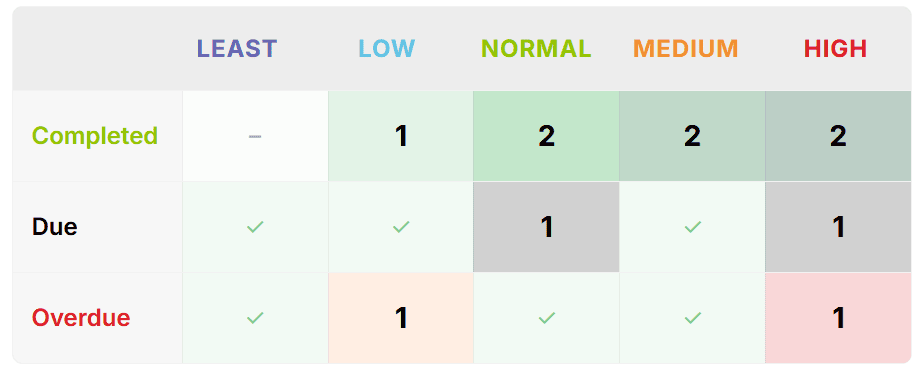
The Focus Matrix is displayed on your Launch Pad dashboard. It maps your tasks across two dimensions: completion status and priority level. The result is a visual matrix that shows you exactly where to direct your attention.
Each cell in the matrix is color-coded by urgency. A high-priority overdue task gets the highest-urgency color — red. A low-priority completed task stays calm. At a glance, you know what's on fire and what's under control.
Performance Score
The Focus Matrix generates a single performance score. Early completion earns a bonus. On-time completion is baseline. Late completion carries a penalty.
You're consistently completing tasks ahead of schedule. Your discipline is strong.
You're performing at a healthy, sustainable pace. Tasks are getting done on time.
Some tasks are slipping. Review your schedule and priorities.
Significant tasks are overdue or consistently late. The Focus Matrix will show you where the problems are.
Why automatic assessment matters
Self-reported performance is unreliable. People overestimate their consistency and underestimate their gaps. Oddapy removes that bias entirely. The score is objective, based on timestamps, and cannot be manipulated retroactively. You see yourself clearly — and that clarity is what drives real improvement.
Your active goals, always one tap away
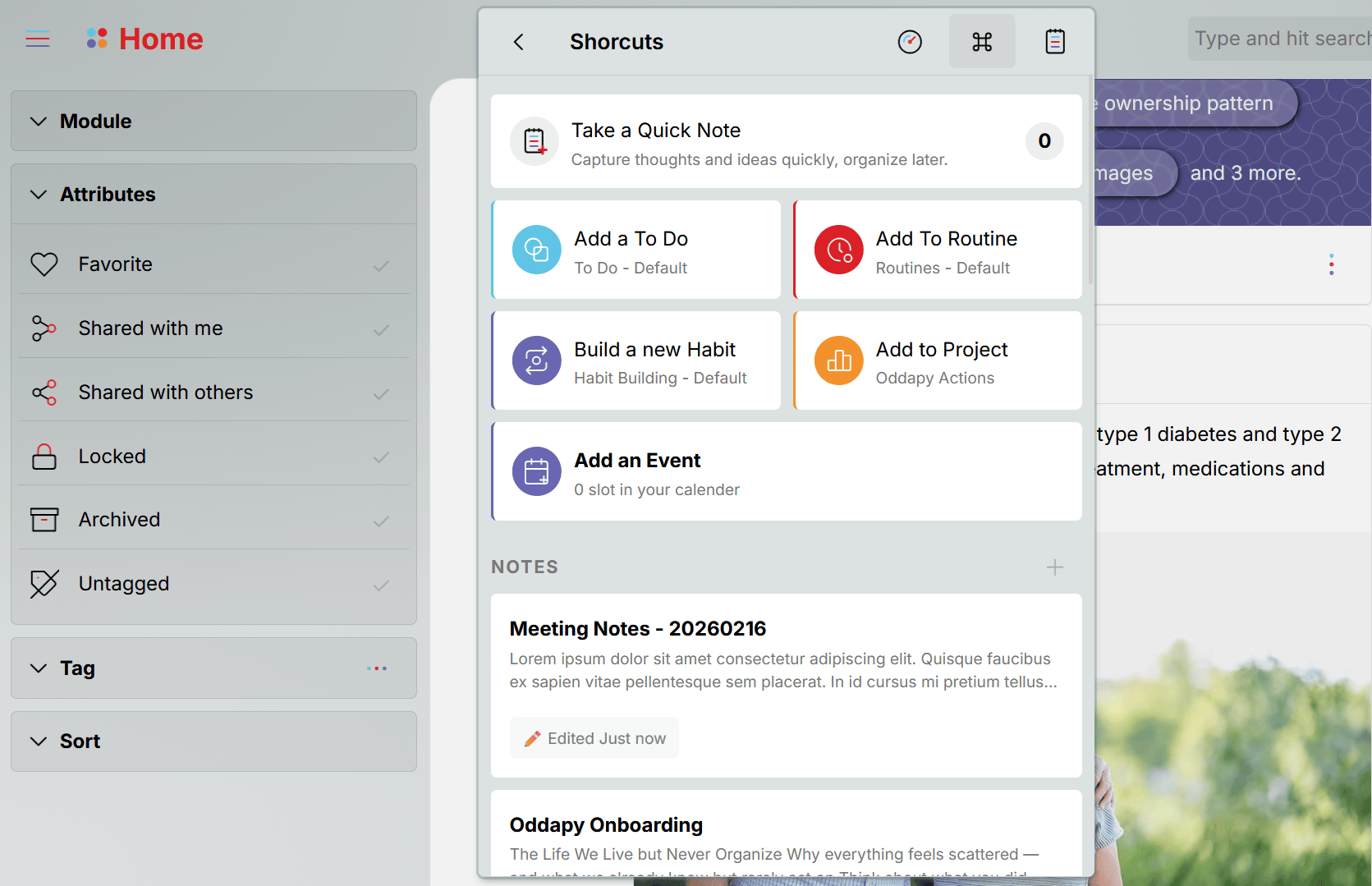
Pin your most-used goals to the Launch Pad Shortcuts page. Each pinned goal lets you create tasks directly — no need to navigate through the Home feed or dig into the Explorer. Tap the goal, add a task, and you're done.
Most people work with a handful of goals at any given time — a To Do list for errands, a Routine goal for daily discipline, a Habit goal they're building, maybe a Project they're pushing through. Pinning these to Shortcuts puts them front and center, turning your Launch Pad into a personal command panel for task creation.
When you sign up, Oddapy creates three goals and pins them to your Shortcuts automatically: a To Do list, a Routines goal, and a Habits goal. You can start adding tasks immediately — no setup, no configuration, no figuring out where things live.
Your performance at a glance
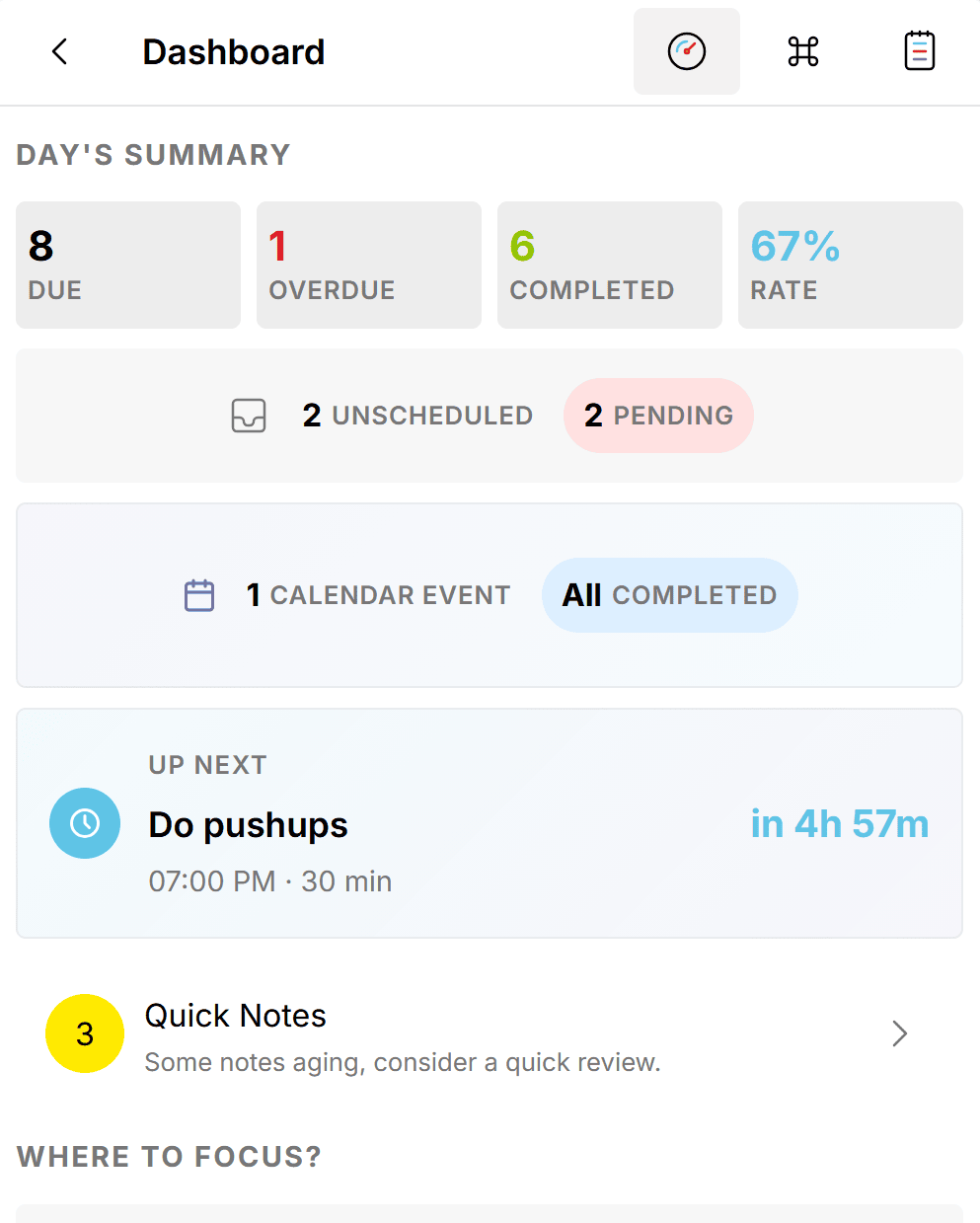
The Launch Pad dashboard gives you a real-time snapshot of your task world.
All data updates in real time. Open the Launch Pad, and you see exactly where things stand — no refresh, no delay.
Start in seconds, not hours
When you sign up for Oddapy, three goals are already created and pinned to your Launch Pad: a To Do List, a Routines goal, and a Habits goal. You don't need to set anything up. Just open the app and start adding tasks.
Add your first task
Tap the task button and search from over 1,500 templates — or create from scratch. The slot finder shows your available free time so you can schedule into an open gap. Set name, description, and priority. That's it — your task is created.
Work through MyDay
Open MyDay each morning. Your day unfolds as a timeline — each task is a milestone, ordered by scheduled time. Work through them from first to last. Mark each one complete as you go.
Review your score
Open the Launch Pad dashboard. At a glance — due tasks, overdue tasks, completed tasks, and your overall completion rate. The Focus Matrix maps tasks by status and priority. Every cell is tappable — drill into any metric.
Stop planning to plan. Start tracking your goals.
Sign up free. Three goals are already waiting for you. Add your first task in seconds.
Get Started Free Install AppGoals works better with everything connected
Attach meeting notes to your tasks. Link a shopping list to your weekend calendar. Store project documents alongside your project goals. Every module in Oddapy connects through the calendar.